Chapter 10: Quality & Acceptance
Quality standards, acceptance testing procedures, and product grade comparison for log security system procurement
10.1 Quality Grade Comparison
Not all log security hardware is created equal. The market offers products ranging from basic commercial-grade appliances to purpose-built enterprise-grade systems with full redundancy, hardware security modules, and compliance certifications. The quality comparison image below illustrates the key visible and functional differences between Standard Grade and Enterprise Grade log security appliances, helping procurement teams make informed decisions based on their compliance and availability requirements.
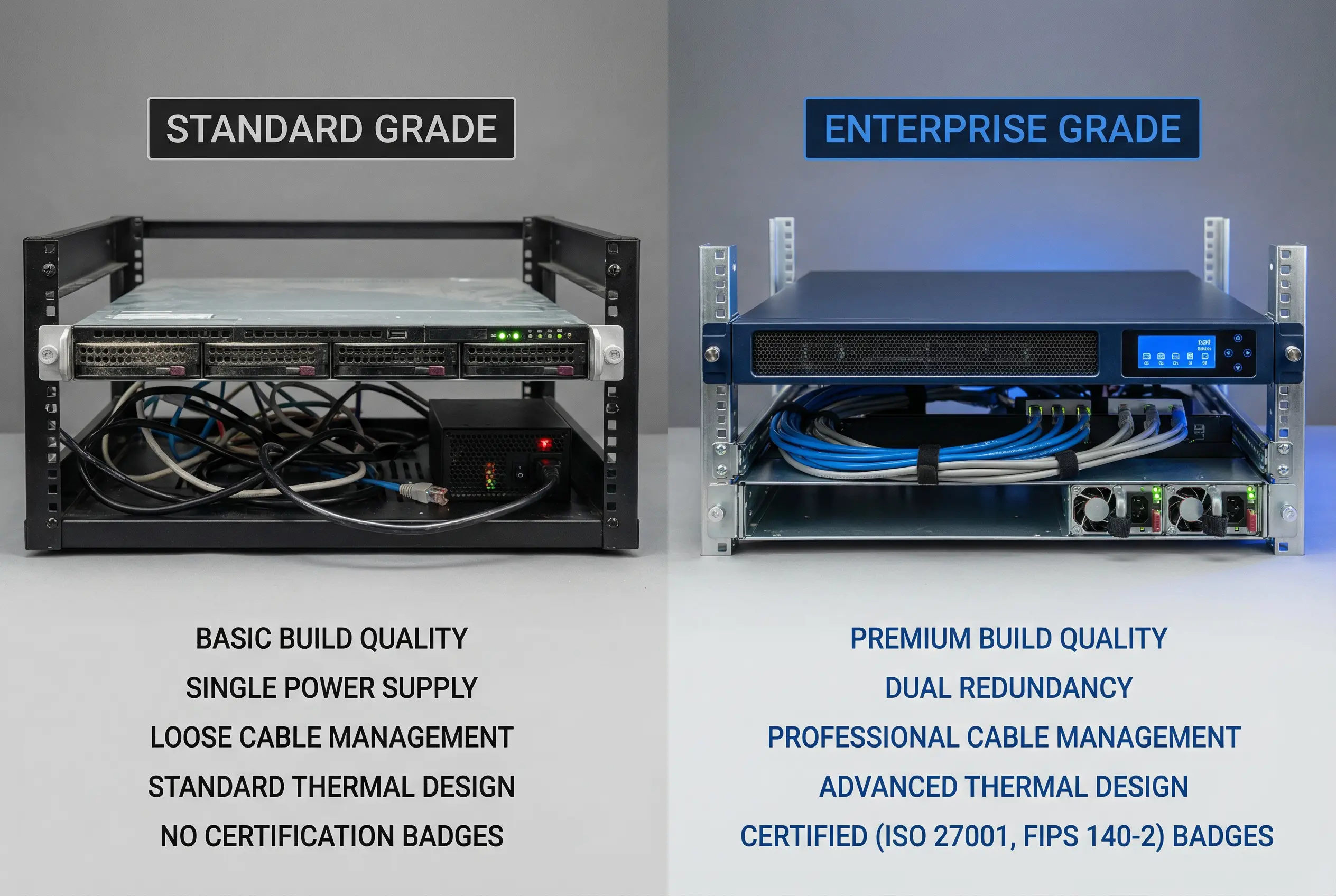
The comparison highlights five critical quality dimensions that directly impact the reliability and compliance posture of the deployed system. Enterprise Grade appliances are designed for continuous unattended operation in regulated environments, while Standard Grade appliances are suitable for lower-criticality deployments where some downtime is acceptable. The table below provides a detailed specification comparison across all quality dimensions.
| Quality Dimension | Standard Grade | Enterprise Grade | Impact on Compliance |
|---|---|---|---|
| Build Quality | Commercial server chassis, plastic bezels, no dust filters | Industrial-grade chassis, metal bezels, dust-filtered vents, vibration-damped drives | High — hardware failures cause log gaps |
| Power Redundancy | Single PSU, no hot-swap capability | Dual hot-swap PSUs, automatic failover, SNMP monitoring | Critical — PSU failure causes outage |
| Storage Reliability | SATA consumer drives, RAID 0/1 only | Enterprise NVMe/SAS drives, RAID 5/6/10, predictive failure monitoring | High — drive failure risks log loss |
| Thermal Design | Standard airflow, no redundant fans | Hot-swap redundant fans, front-to-back airflow, thermal monitoring | Medium — overheating causes failure |
| Certifications | CE/FCC only | ISO 27001, FIPS 140-2, Common Criteria EAL2+, UL/CSA | Critical — required for regulated industries |
| Management Interface | Basic web UI, no out-of-band management | Front panel LCD, dedicated IPMI/iDRAC, out-of-band management NIC | Medium — affects incident response speed |
| Warranty & Support | 1-year NBD, parts-only | 3–5 year 24×7 NBD, on-site, advance parts replacement | High — affects MTTR for compliance SLAs |
| Typical Price Range | $2,000–$5,000 per unit | $8,000–$25,000 per unit | N/A — cost vs. risk trade-off |
10.2 Acceptance Testing Procedure
Acceptance testing is a mandatory step before a log security system is placed into production operation. The acceptance test verifies that all hardware, software, and integration components meet the design specifications and compliance requirements. The test must be conducted by an independent party (not the installation team) and must be documented with signed test records. The following steps define the standard acceptance testing procedure.
Hardware Inspection Mandatory
Verify that all hardware components match the approved Bill of Materials. Check for physical damage, tamper-evident seal integrity, and correct rack installation. Verify that all cable connections match the approved cabling diagram. Confirm that all power connections are properly grounded.
Network Connectivity Verification Mandatory
Verify that all network interfaces are connected to the correct VLANs as per the network design. Test connectivity between each collector and the ingest gateway using mTLS test connections. Verify that firewall rules correctly block all unauthorized traffic between zones. Confirm that management interfaces are accessible only from the management VLAN.
Time Synchronization Test Mandatory
Verify that all components are synchronized to the designated NTP servers. Measure NTP drift on each component — must be less than 50ms. Verify that NTP authentication is enabled and using the correct shared key or certificate. Simulate NTP server failure and verify that the backup NTP server is used automatically.
Log Ingestion and Hash Chain Test Mandatory
Inject a known test log stream at the design EPS rate and verify that all events are received and stored. Verify that the hash chain is correctly formed by checking the chained hash values of the first 100 stored segments. Inject a modified log segment and verify that the integrity verification system detects the modification and raises an alert. Verify that the alert is delivered to the designated recipients within the SLA.
WORM / Immutability Test Mandatory
Attempt to delete a stored log segment using administrative credentials and verify that the deletion is rejected by the storage platform. Attempt to modify a stored log segment using direct storage API access and verify that the modification is rejected. Verify that the WORM lock expiry date is correctly set to the required retention period. Document the test results with screenshots of the rejection errors.
Failover and Recovery Test Mandatory
Simulate failure of the primary collector by disconnecting its power supply and verify that the secondary collector takes over within the specified RTO (typically <30 seconds). Verify that no log events are lost during the failover by comparing event counts before and after. Simulate network outage between collector and gateway and verify that the local buffer correctly stores events during the outage. Restore connectivity and verify that buffered events are correctly forwarded and stored.
Access Control and Audit Test Mandatory
Verify that each role (operator, analyst, auditor, admin) can only access the functions permitted by the RBAC policy. Attempt to access restricted functions with a lower-privilege role and verify that access is denied and logged. Verify that all access events are recorded in the admin audit store. Verify that the admin audit store itself is immutable and cannot be modified by any role.
Performance Baseline Test Recommended
Run a sustained load test at 100% of design EPS for 4 hours and verify that no events are dropped and no alerts are generated. Run a burst test at 200% of design EPS for 15 minutes and verify that the buffer correctly absorbs the burst. Record CPU, memory, disk I/O, and network utilization as a baseline for future capacity planning. Verify that all performance metrics remain within the specified thresholds.
10.3 Acceptance Test Pass/Fail Criteria
| Test Item | Pass Criterion | Fail Action | Priority |
|---|---|---|---|
| Hardware inspection | All items match BOM; no physical damage; all seals intact | Replace damaged components; re-inspect | Mandatory |
| Network connectivity | All mTLS connections established; all unauthorized paths blocked | Reconfigure firewall rules; retest | Mandatory |
| NTP drift | All components: drift <50ms; backup NTP failover <60s | Reconfigure NTP; retest | Mandatory |
| Hash chain integrity | All 100 test segments: hash chain valid; modification detected in <60s | Investigate hash chain implementation; retest | Mandatory |
| WORM immutability | All deletion/modification attempts rejected; WORM expiry correct | Reconfigure storage WORM policy; retest | Mandatory |
| Failover & recovery | Failover <30s; zero event loss; buffer replay complete | Tune HA configuration; retest | Mandatory |
| Access control | All RBAC violations denied and logged; admin audit immutable | Reconfigure RBAC; retest | Mandatory |
| Performance baseline | 4h sustained: 0 dropped events; burst: buffer absorbs 200% EPS | Scale up hardware; retest | Recommended |